CID Study Guide
Introduction to Internetwork Design
This Cramsession Covers Cisco’s CID exam to help you to finish off your process to becoming a CCDP by passing your exam. This Study Guide covers the posted objectives outlined by Cisco and provides links to more information to help in your studies. As outlined by Cisco, there is no way to fully prepare for this exam without first going through the posted objectives and making sure that you are comfortable with what is listed and being able to “design” such technologies from Cisco’s perspective. Make sure you thoroughly go over these objectives and understand them fully while preparing for this exam. The exam covers a very wide range of technologies and that is where the difficulty comes in. Make sure you cover all areas completely as you may only get a few questions from each section. Good Luck.
Network Design Fundamentals
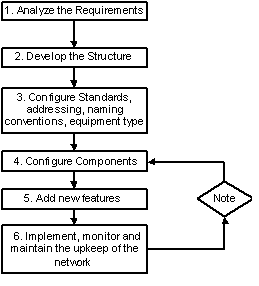
Network Design Fundamentals include having a basic network design methodology. This is outlined as follows – but can change as per which or whose diagram and flowchart you use. They are all generally the same. Here is Cisco’s Original Chart:
Note: You do not need to memorize the numbers; they are listed here to show the order in which they are applied. Memorization of the steps is needed for the CID exam. If step 6 does not work, then go to step 4. The listing below is a more granular breakdown of the methodology.
Methodology and Design Steps
Gather Information
You need to first gather information about the network you are addressing and then analyze the requirements.
Analyze Requirements
Analyze the requirements for the design.
Develop the Internetwork Structure
Before you actually develop the structure, you need the first two steps completed to get an accurate structure development.
Network Performance Estimation
Look at the performance of the network and give a good estimate on how it will work.
Assess Risk and Costs
Every network has cost and risks associated with it; gather them here.
Implement Network
This is where you roll out the network and implement it.
Monitor Network
Now that it exists, you need to monitor it and continue to do so over time. If problems exist, go back and fix things as needed, then re-monitor to see if the issues are resolved.
Design Models
Cisco has many Design Models that you can follow. They are fairly generic and will allow you to guide your design against business and technical needs. A complete listing of design guidance can be found on the Cisco website:
Star
Administration, setup and management is easy but you will have a single point of failure. If this occurs at the center of the star, it may bring down the entire star.
Ring
This model is more costly than the star, but the benefit is that it does not have the single point of failure.
Flat Earth
Very easy to set up but it is not easy to scale to larger networks.
This should be used for a very small network where broadcast traffic will not cause a sever impact on the network.
Mesh (Partial)
Added Redundancy, a cleaner solution than the full mesh. You would mesh what needs to be redundant only, making for a scaled down cost.
Make sure you know what is redundant and what is not.
Because the network is “partially” meshed, you will not have “full” redundancy.
Mesh (Full)
Full redundancy, highly scalable, high cost and more management needed.
3 Tier
Very Scalable. Troubleshooting is easier, and easier to manage.
This model is also costly because of the levels of equipment you need to implement.
Make sure you go over these models and know when you would use them in a design.
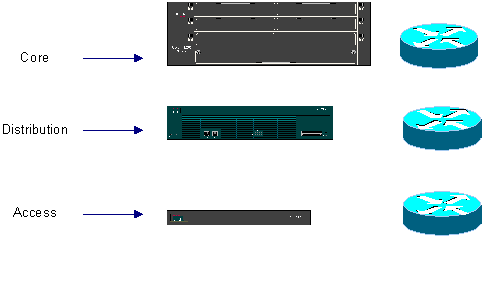
Cisco’s Hierarchical Model
Cisco Documentation: Hierarchical Model
This is Cisco’s Hierarchical Model that Cisco wants designers to follow when looking at implementing a network design. It really does help in organizing your thoughts on where to leverage certain products in the Cisco Product line. You need to know the basics of Cisco’s product line for this exam, including knowing the router families, switch families, and WAN switching hardware.
Note: For the Exam you will be expected to know how to follow this model to implement a scalable, manageable, high performance campus design. You need to know how to base the design on the hierarchical model. The most comprehensive set of information on this objective can be found on Cisco’s Website Design Guide.
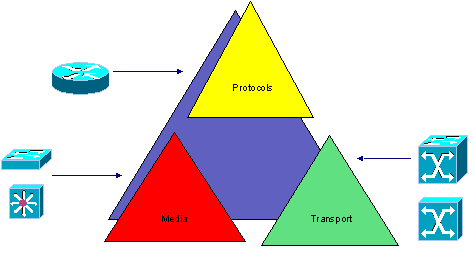
Solving Problems with DesignMemorize the following model:
Desktop Protocol Design
Know the basics of Implementing, troubleshooting and working with Desktop protocols by Microsoft, Novell and Apple. Microsoft Protocols were designed for flat networks where all the clients and servers are sharing the same media. There are different remedies and methods of encapsulations for handling these problems.
Desktop Protocol Fundamentals
Use the following chart to look at the basics of Desktop Protocols:
NetBIOS
Broadcast-based.
Does not have logical addressing functionality and operates primarily at the Session Layer.
NetBEUI
Broadcast-based.
Does not have logical addressing functionality and operates at the Transport and Network Layers of the OSI Model.
NetBEUI, which must be bridged and cannot be routed, unless encapsulated in another protocol such as NWLINK (NetBIOS over IPX) or NBT (NetBIOS over TCP/IP)
AppleTalk
Versions include Phase 1 (antiquated, does not scale well) and Phase 2 (current version)
Phase 2 allows a greater number of hosts per segment (253) and supports Token Ring, Ethernet and FDDI.
For more info visit Appletalk on Cisco’s Website about routing and how to route AppleTalk.
IPX/SPX
Stands for Internetwork Packet Exchange, Sequenced Packet Exchange.
A routable protocol and has different encapsulations (seen below in the chart)
Encapsulations must match to see other machines on the network, or, although it is not recommended, you can run two different encapsulation methods on the same router interface.
Use the Ipx route-cache same interface command.
The default for Novell 3.X protocol support is Raw Ethernet or ETHERNET_802.3 (Novell-Ether)
For Novell 4.X, protocol support is ETHERNET_802.2 (SAP)
Raw Ethernet (ETHERNET_802.3) is similar to the IEEE 802.3 frame with no Logical Link Control and FFFF in the DSAP (Destination Service Access Point) and SSAP (Source Service Access Point)
Memorize the Frame types chart below for the CID exam.
TCP/IP
Transmission Control Protocol/Internet Protocol.
Is a widely used routable protocol, and its biggest challenge is proper management with addressing, security and broadcast management.
Frame Types
ETHERNET_802.2
Novell4.X
sap
E0E0 in DSAP & SSAP
Standard IEEE frame format
includes 802.2 LLC headerETHERNET_802.3
Novell3.X
novell-ether
FFFF in DSAP & SSAP
Includes IEEE 802.3 length field
No IEEE 802.2 LLC headerETHERNET_SNAP
snap
snap 8137
Extends IEEE 802.2 header by adding SNAP header.
ETHERNET_II
arpa
arpa 8137
Standard Ethernet 2 header
TCP/IP Fundamentals
This is a collection of TCP/IP based addressing fundamentals you will need to be familiar with for the exam:
Private Addressing
The usual address prefixes are 10, 172 and 192.
Used for private networks not openly exposed to the Internet (inside a firewall or private network)
Full Ranges are:
10.0.0.0 – 10.255.255.255
172.16.0.0 – 172.31.255.255
192.168.0.0 – 192.168.255.255
Public Addressing
Assigned by an ISP and not recommended for private networks.
Private to public network communication can be accomplished by NAT through a PIX or other firewall.
Options also include VPN (Virtual Private Networks) or extranets secured through PPTP (Point-to-Point Tunneling Protocol) and/or L2TP (Layer 2 Tunneling Protocol)
Hierarchical Addressing
Use address schemes where the different network numbers determine whether a destination is local or remote.
Longer subnets masks are used at the access layers. The network prefix gets smaller as you move up the network hierarchy.
Classful Addressing
Subnetting not used and the router (using a routing protocol like RIPv1) will not look at a VLSM.
The Router will look at the address as if it was one of the default class A, B, or C addresses. In other words, if you subnet a Class B as so: 152.32.128.X with a Mask of 255.255.255.0, you may think it is a class C address although it is a “B” Subnetting down to the third octet.
VLSM
Variable Length Subnet Masking.
Classless addressing allows using, for example, a Class B address with a Class C subnet mask.
Usually summarized in this fashion 172.98.98.24/30 (30) or 255.255.255.252. These methods specify the number of bits used to calculate the network portion.
This allows effective use of your IP addresses and should only be used with routing protocols that support VLSM, like EIGRP and OSPF.
Secondary Addressing
The assignment of a second IP gateway address for the same interface on a router.
This is a convenient way to allow you to switch from one address convention to another simultaneously.
This is not recommended and should be used only when you have to.
Basic IP Classes
Class A
1 – 126 (127 Loopback)
Class B
128 – 191
Class C
192 - 223
AppleTalk Basics
Cisco Fundamentals on Appletalk; covers sockets, protocols and how to configure them.
Cisco Frequently asked questions on Appletalk.
Encapsulation Protocols
PPP
Point-to-Point Protocol.
Is an encapsulation standard used over Async Serial, Sync Serial and ISDN.
PPP is split into 2 separate protocols: NCP and LCP:
NCP: Network Control Protocol.
Each NCP is used for configuring the connections of each LAN protocol at the network level (IP, IPX, CDP, etc.)
LCP: Link Control Protocol.
LCP is a component of PPP and is responsible for authentication, multilink, callback and compression.
Note: More info is listed below this chart about PPP.
SLIP
Serial Line Internet Protocol.
Only supports TCP/IP.
Replaced more and more by PPP. Although this is an older technology, it is still in use today, mostly on older hardware.
HDLC
High-level data link control.
Is a bit-oriented synchronous data-link layer 2 protocol.
Is a data encapsulation method used on synchronous serial links.
Is used for serial lines and this version is proprietary for Cisco.
Do not use if connecting to a non-Cisco router or with the AutoInstall feature.
SDLC
Synchronous Data Link Control.
SDLC is a bit-oriented, full-duplex serial protocol.
Often used in SNA environments.
LAPB
Link Access Procedure (Balanced)
Data link layer protocol in the X.25 protocol stack.
LAPB is a bit oriented protocol derived from HDLC.
Used over unreliable links and X.25.
Connection-oriented with ordering and error checking.
STUN
Serial Tunneling.
Used to tunnel SNA over WAN links.
It supports local ACK used with SDLC on congested WAN links.
PPTP
Point-to-Point Tunneling Protocol.
Used to tunnel IP packets securely over the Internet.
GRE
Generic Routing Encapsulation.
Used primarily in the backbone.
Can be used to tunnel IPX or AppleTalk.
Fast switching supported.
NWLINK
Used to encapsulate NetBIOS over IPX.
Requires type 20 packets to operate properly.
Use the Ipx type-20-propogation command on the interface.
NBT
Used to encapsulate NETBIOS over TCP/IP.
AURP
AppleTalk Update Routing Protocol.
Encapsulated in TCP/IP over WAN links.
Sends updates only.
IPXWAN
Client and server side software used with PPP to connect servers or clients over a dial-up connection.
It is responsible for establishing a routing metric once the connection is made.
It is dynamic and requires no configuration.
Multilink PPP
Allows additional calls or channels to connect to a host for additional bandwidth
In order to use Multilink with Brand X routers, the routers must comply with RFC1990
Multilink is configured on the interface
LCP controls Multilink:
Works on Cisco 700 series routers
Works on routers running Cisco IOS
RFC 1990 allows for vendor compatibility
Allows packet fragmentation across channels
Sequences packets and performs load calculation on lines or channels
4-Byte field in header allows for proper sequencing
Multilink Multichassis PPP
Dial-in ISDN channels can be split off to different access servers (a.k.a. stackgroup) or routers
The access servers (stackgroup) or routers intake the data packets and forward them to a high end MMP process server
A process server uses SGBP (Stackgroup Bidding Protocol) to do all the packet reassembly
The advantages are that the stackgroup is very scaleable and less overhead is required from the access servers
Remote Access Design Principals
Design principals are shaped around the type and numbers of connections that need to be made
The applications and requirements will depend on the type of users that will be connecting to the network
Users usually fit into these categories:
Mobile Users/Telecommuters
Not connected all the time.
Short connections and low bandwidth requirements, usually analog.
Full Time Telecommuters
Usually require faster connections.
Longer connect times with higher bandwidth requirements.
Use ISDN to run other devices or connections.
Home or Small Office
Requires fast and long connection time.
Multi-interface router needed to support LAN and multiple WAN connections.
Access Methods
Remote Gateway
Limited access and limited functionality.
It can be used only to get email or access an application.
Remote Node
Most common access method.
It is like dialing into a security server, RAS server, modem bank or access server stackgroup.
This is the preferred method since it is very flexible and scales well in the Enterprise.
Has less overhead and PC appears as if directly connected to the LAN.
Remote Control
A PC dialing in and taking control of another PC on the LAN.
User has full function of network services.
This requires the most overhead because an extra PC, analog line and modem are required.
A good example of this is pcAnywhere.
Routing Protocols
It is important to distinguish between routed and routing protocols
Routing protocols use metrics; hop counts, ticks, etc. to make a routing decision
Since routers do not forward broadcasts, routers separate networks into different broadcast domains
Switches and bridges separate media into separate collision domains
Routed Protocols are TCP/IP, IPX/SPX and AppleTalk
For more info on Cisco Routing: Cisco Routing Basics
Protocol List
IGRP
Interior Gateway Routing Protocol.
Cisco Proprietary.
Distance Vector.
Updates every 90 sec.
VLSM not supported.
Must use IP and Classful IP addresses.
Can load balance.
For more Information on IGRP: Cisco IGRP Documentation
EIGRP
Enhanced Interior Gateway Routing Protocol.
Cisco Proprietary.
Hybrid.
VLSM Supported.
Uses Bandwidth, Delay, Load, Reliability, and MTU for metrics.
Supports multi-protocols.
Scales well and converges quickly.
For More Information on IGRP: Cisco EIGRP Documentation
RIP
Routing Information Protocol.
Distance Vector.
Does not support VLSM.
Updates every 30 sec.
Metric is Hop Count.
Max Hop count is 15.
Chatty and does not scale well.
For More Information on RIP: Cisco RIP Documentation
RIPv2
Routing Information Protocol Version 2.
Distance Vector.
Supports VLSM.
Updates every 30 sec.
Metric is Hop Count.
For More Information on RIPv2: Cisco RIP2 Documentation
OSPF
Open Shortest Path First.
Link State.
Cost is used as Metric.
Uses LSAs to check on links.
Backbone is area 0.
Supports VLSM and non-contiguous subnets.
OSPF recalculates a new table when a route goes down. So, if you have a link flapping, you may want to increase the amount of time to wait; use the spf holdtime command. If not, it could overload the CPU and cause performance issues.
OSPF Backbone:
Try to stay away from meshing the backbone.
Use LAN backbone design and keep everything to one hop.
Use as few routers as possible to keep the diameter small.
For More Information on OSPF: Cisco OSPF Documentation
BGPv4
Border Gateway Protocol Version 4.
Metric is cost.
BGP is an Exterior Gateway protocol and is also used to replace EGP (EGP is a particular instance of an exterior gateway protocol and the two should not be confused)
BGP performs InterDomain routing in TCP/IP based networks.
For More Information on BGP: Cisco BGP Documentation
RTMP
Routing Table Maintenance Protocol.
AppleTalk based.
Distance Vector.
10 sec update interval.
Uses a Hop count as a metric.
Very chatty, not recommended for WAN traffic or slow links.
For More Information on RTMP: Cisco RTMP Documentation
NLSP
Netware Link Services Protocol.
Link State Protocol.
Uses cost.
Link state for IPX/SPX (Netware) used to fix many of the issues with IPX RIP and SAP.
Robust and scales well.
Routing information is transmitted only when the topology has changed (IPX RIP Broadcasts every 60 secs)
NLSP routers send service updates only when services change (SAP sends every 60 secs)
NLSP can support up to 127 hops where RIP supports only 15 hops.
For More Information on NLSP: Cisco NLSP Documentation
AURP
AppleTalk Update Based Routing Protocol.
Link State.
AppleTalk.
Tunneled by IP over WAN links.
This is Apple’s attempt to create a better WAN-friendly routing protocol than RTMP.
RTMP is encapsulated in IP over an AURP Tunnel on WAN links.
Reduces WAN traffic because only updates are sent over the wire.
Use in an IP only WAN environment.
For More Information on AURP: Cisco AURP Documentation
OSPF LSA Information
LSA1
Router Links LSA.
Sends information about the routers links.
LSA2
Network Link LSA.
Sent by the DR to all routers in the AS.
A list of routers in the segment.
LSA3
Summary Link LSA.
Sent by ABR’s list of networks available outside the area.
LSA4
Summary Link LSA.
Sent by ASBR’s list of networks available outside the area.
LSA5
External Link LSA.
Sent by ASBR’s list of external network routes.
Microsoft Design Fundamentals
Workgroups and Domains
Workstations sharing resources are defined as Workgroups when configured to do so (Peer to Peer)
The presence of an NT server classifies it as a domain (As long as your server is configured to be a domain)
Domains make the administration of resources easier and more secure.
Single Domain Model
Services controlled by one PDC for clients.
Master Domain Model
A collection of domains trusting a single master PDC for centralized administration.
Simplifies management of resources.
Multiple Master Domain Model
Resource domains trusting multiple master domain PDCs.
Complete Trust Domain Model
All domains trust all other domains and resources can be administered and shared across these domains.
Campus and Switching Design
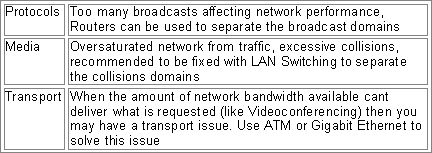
Common campus issues are Media, Protocols and Transport. Media issues are caused by high network loads and media contention. Use LAN switching to solve this problem. Another protocol problem is that some do not scale well and are prone to excessive broadcasts. To solve this problem, use routers to segment your network. Transport problems occur when there is not enough bandwidth to support high bandwidth applications. Use ATM, Gigabit Ethernet and/or QOS OIS features to solve these problems. (This is also mentioned in the chart in the beginning of the Cramsession.)
Cut-through
A packet is forwarded once the destination is read.
No CRC check.
Store and Forward
The entire packet is processed.
Check the CRC, then forwards the packet out the appropriate interface or port.
VLANS
802.1Q is a VLAN standard.
VLANS help separate broadcast domains.
A router is required for communication between VLANS.
Switching separates or creates collision domains.
Distributed Backbone
Each floor or building is isolated by its own router and switch.
This setup is more expensive and often requires costly upgrades to scale.
Collapsed Backbone
All floors are wired into a single switch and router.
More cost effective, but creates a single point of failure.
BPDU
Bridge Protocol Data Unit.
Spanning Tree Protocol hello packet that is sent out at configurable intervals to exchange information among bridges in the network.
Bridging Fundamentals
Transparent
Found in Ethernet Networks.
“Transparent” to the Clients on the network.
The device (switch) knows where to forward the frame via the MAC table.
Source Route
Found in Token Ring Networks.
All forwarding decisions are known in advanced and based on the RIF.
Translational
Translates between Token Ring and Ethernet.
Allows both to function in a mixed environment.
Source Route Transparent
Combines both Source Route and Transparent.
Needed for Mixed Token Ring and Ethernet networks.
Source Route Translational
Combines both Source Route and Translational.
Needed for Mixed Token Ring and Ethernet networks.
Describe the use of Hot Standby Router Protocol (HSRP) in a campus network environment
HSRP is used in a network environment for Routing Redundancy
If one router goes down, the other takes over
This is ideal for Core Router Design where downtime is not an option
Check here for everything you need to know about HSRP and how to configure it: Cisco HSRP
Define Integrated Routing and Bridging (IRB)
Integrated routing and bridging
Integrated Services Digital Network (ISDN) User Part
Upper-layer applications supported by SS7 for connection, set up, and tear down
Asynchronous Transfer Mode (ATM)
ATM (Asynchronous Transfer Mode)
Like Frame Relay and X.25, it uses PVCs and SVCs to establish connectivity
Used for high-speed data, video and voice
It uses cells to transport information in 53 byte cells (48 bytes in the body and 5 bytes in the header)
ATM uses prefix routing in private networks
ATM Features
5 bytes for header, 48 for data
QOS is effective for managing ATM
Flexible multiplexing and switching technology
Low latency thanks to small cells and high speed media
Supports high performance applications
Uses SNAP encapsulation to multiplex several protocols
SVC are disconnected once transmission is complete
Operates primarily at the Data Link Layer of the OSI model
ATM Components
AAL
ATM Adaptation Layer.
Operates at the Data Link Layer, and its primary function is to hide what it is doing to the frames from the higher OSI Layers.
Abstraction is right.
ATM Layer
Establishes connections and passes cells through the ATM network.
ATM Physical
Manages the physical transmission of the cells.
Does the bit-to-cell conversion.
AAL1
Connection-oriented.
Needs time sequencing from source to destination and vice versa.
AAL3/4
Connectionless-oriented; used to transfer SDMS.
It loses some payload capacity because of added CRC, MIDs (Message Identifier) and the sequence number.
There is a slightly increased delay attributed to the SAR (Sequence Assembly Reassembly)
Requires the use of a SDSU for SAR.
AAL5
Connection and connectionless-oriented.
Used for data transport.
Uses SEAL for SAR.
PNNI
Private Network Node Interface.
A hierarchical routing protocol used for ATM routing.
It is dynamic and requires little configuration.
Scalable, but complex.
IISP
Interim Inter-Switch Signaling Protocol.
Is a static routing on ATM network.
Uses SVCs when routes go down.
LANE
LAN Emulation.
Emulation of a LAN over an ATM network.
LEC
LAN Emulation Clients.
Sends its MAC address to the LECS server.
It can be a workstation or a router.
It is responsible for endpoint functions, address resolution and data forwarding.
LES
LAN Emulation Server.
Pseudo-WINS server for ATM.
Acts as a register to store the multicast or unicast MAC address information of the LE clients.
It accepts LE-ARP requests for destination MAC addresses.
LECS
LAN Emulation Configuration Server.
Serves multiple ELANS and maintains a database of all the LEC’s MAC addresses.
LECS respond to LEC’s requests by sending the appropriate ELAN information (identifier)
Used like DHCP to assign LECs to certain ELANS.
This is a one-per-ATM switch.
BUS
Broadcast and Unknown Server.
Multicast and broadcast server.
Sends traffic to clients of the ELAN it is responsible for.
X.25
X.25 is a packet-switched Layer 2 protocol that operates at the Data Link Layer of the OSI model *(It also operates at Layer 3)
This protocol works by encapsulating the Layer 3 protocols
X.25 was engineered for strong error checking and flow control at Layers 2 and 3
X.25 uses LAPB and is very reliable
It also uses sliding windows (much like TCP/IP) for flow control
Suffers from lower throughput and higher latency than Frame Relay
X.25 uses SVCs (Switched Virtual Circuits) and PVCs (Permanent Virtual Circuits)
PVCs are always connected
X.25 treats connection as a reliable data link; Frame Relay does not
Transport Layer 4
X.25
Network Layer 3Network Layer 3
LAPB
Datalink Layer 2Datalink Layer 2
Physical Layer 1
Physical Layer 1
X.25 Components
PAD
Packet Assembler Disassembler.
It collects the data transmissions from the terminals and gathers them into a X.25 data stream and vice versa.
PAD acts like a multiplexer for the terminals.
During configuration of the X.25, you specify whether the interface will act as a DCE or DTE.
When configured as a DCE the router behaves as an X.25 switch.
X.121
The addressing standard.
Static mappings must be made manually.
X.25 does not support ARP.
The addressing standard is a 4-digit country code.
The following 8 to 11 digits are assigned by the X.25 service provider.
Options for X.25
Windows and packet sizes must match on both sides on the connection.
Use the x25 ips command for incoming packet size and x25 ops for outgoing packet size.
Window size uses a counter for when to send an acknowledgement (x25 win and x25 wout commands are used)
The modulo controls the size of the window. 8 or 128 are used to specify the number of packets.
Satellites use X.25 as well.
To increase performance, they use modulo 128 which sets the window size higher.
Frame Relay
Frame Relay Components
Frame Relay
Frame Relay requires the use of a CSU/DSU.
Like X.25, Frame Relay uses SVCs and PVCs.
PVCs are used for frequent and long connection times.
SVCs are for sporadic, infrequent traffic.
It is a Layer 2 protocol.
LMI
Local Management Interface.
There are 3 types:
Cisco (Default)
ANSI
Q.933A
The service provider will specify the LMI in use.
LMIs control data keep-alives and verify the dataflow.
Uses multicast mechanism to provide network server the DCLI.
Uses multicast addressing so DLCI has global significance.
Verifies the DLCIs in use and status to the local Frame-Relay switch.
LMI Autoconfigure:
A router with IOS 11.2 and newer does not need to be configured for the LMI.
The newer routers will send a signal to the FR switch to determine the LMI in use.
DLCI
Data Link Connection Identifier.
Verifies the logical circuits in use and the status from the CPE to the Frame Relay switch.
Encapsulation Types
Two Types are:
Cisco (default)
IETF
If the router is a non-Cisco router, use IETF.
This designation can be made per DLCI.
Even if all the routers are Cisco, you can communicate with a location with a non-Cisco router.
Specify the IETF encapsulation and DLCI.
You can use this with the map command.
In short, encapsulation can be set to per interface or per destination.
Split Horizon and Routing Updates
Since routing updates should not be sent out from the same interface you receive the update from (as this causes routing loops), the solution to this problem is creating subinterfaces with different DLCIs.
Each subinterface has its own DLCI-enabled multipoint connection.
Routing updates will now work properly.
Frame Relay Map
This command is used to configure the next hop address on an interface.
Inverse ARP
Takes care of all the mappings for you
It builds a Frame-Relay map by querying the Frame-Relay switch during the LMI exchange.
It sends an Inverse ARP request for the protocols that are specified on the interface.
The downside for the automatic set up is troubleshooting can be a pain.
NBMA Model
Non-Broadcast Multi-Access Model.
Mesh between peer routers.
Routers are configured as a simulated LAN and are configured as one logical subnet.
The downside is processor overhead: each broadcast packet must be processed.
Broadcasts are sent out each virtual circuit.
Results in performance degradation on the link.
To control the amount of bandwidth used on an interface use the frame-relay broadcast-queue command.
Virtual Circuit Routing
Uses Subinterfaces to conquer the split horizon issues.
This simulates several point-to-point links.
Voice and Video Basics
VoIP
Voice over IP.
The capability to carry normal telephony voice over an IP network while keeping reliability and quality of voice.
VoIP enables a router to carry voice traffic over a network (LAN or WAN)
In VoIP the DSP does the following:
Segments the voice signal into frames.
The frames are then are coupled in groups of two.
The Groups of two are stored in voice packets.
Voice packets are being transported using IP in compliance with ITU-T specification H.323.
VIC
Voice interface card.
Connects the system to either the PSTN or to a PBX.
Compared with WIC or WAN Interface Card.
VoFR
Voice over Frame Relay.
VoFR enables a router to carry voice traffic over Frame Relay.
The voice traffic is segmented and encapsulated for transit across Frame Relay using FRF.12 encapsulation.
VoD
Video on demand.
System uses video compression to supply video to viewers when requested.
VoATM
Voice over ATM.
Voice over ATM enables a router to carry voice traffic over an ATM network.
The voice traffic is encapsulated using a special AAL5 encapsulation for multiplexed voice.
VoHDLC
Voice over HDLC.
Voice over HDLC enables a router to carry live voice traffic back to back to a second router over a serial line.
Quality of Service Basics
List Quality of Service and its features, which provide better and more predictable network service
What is QoS?
QoS is the capability of a network to provide better service to selected network traffic over various technologies. Primary goals of QoS include:
Prioritized traffic
Dedicated bandwidth
Controlled jitter and latency
Improved loss characteristics
The features of QoS are going to be highly needed in the future when VoIP and Video over the network really take off because you will need to make this traffic the priority over the network for better performance
Features of QoS
FIFO
First-in, first-out queuing.
Basic Store-and-Forward Capability.
FIFO queuing stores packets when the network is congested and then forwards the packets in order of arrival when congestion dies off. This is the true picture of “first in - first out”.
FIFO is the default queuing algorithm and requires very little (if any) configuration.
FIFO queuing does not look at the packet’s priority level, it only sends out the packets in the order they were received.PQ
Priority queuing.
Works on Prioritizing Traffic.Priority queuing can flexibly prioritize according to:
Network protocol (IP, IPX, or AT)
Incoming interface
Packet size
Source/destination address
Each packet is placed in one of four queues:
High
Medium
Normal
Low
CQ
Custom queuing.
Works on guaranteeing bandwidth.
The traffic is queued in a custom fashion, allowing a specific amount of the queue space to each class of packet.
The queues are serviced in a round-robin fashion.WFQ
Weighted fair queuing.
“Cisco's Intelligent Queuing Tool for Today's Networks”.
It is a flow based queuing algorithm that does two things at the same time:
Interactive traffic is scheduled to the front of the queue to reduce the response time.
The algorithm shares the remaining bandwidth fairly among high bandwidth flows.
This solution does not starve the bandwidth and makes it so that traffic gets predictable service.
SNA Design
SNA (System Network Architecture) Fundamentals
SNA is a hierarchal network structure. There are several components and possible configurations for configuring an SNA network.
For more information on SNA, check out Cisco's SNA Technology Brief
SNA Terminology
NAUs
Network Addressable Units.
All devices that can communicate in an SNA network.
LU
Logical Unit.
The software end unit.
Software that provides the interaction for the users.
PU
Physical Unit.
Controls resources on the node.
Loads software and provides the communication with the SSCP.
SSCP
System Services Control Points.
Software for the mainframe that is responsible for establishing the lines of communication and controlling resources.
SNA Gateways
Handling direct communication with the mainframe for a dumb terminal or PC would be quite rough without a gateway.
LU Gateway
SDLC uses polling to communicate.
Sending polling traffic over the LAN may convince you to establish a gateway.
LU gateways are good because the Mainframe has a SSCP session, to the PU session, to the LU gateway.
The clients only connect to the LU gateway though NetBIOS, so the Mainframe maintains fewer connections.
PU Gateways
Have a larger amount of overhead and administrative burden.
The PCs attached to the PU have to be manually configured on the VTAM.
VTAM
Virtual telecommunications access method.
Set of programs that control communication between LUs.
VTAM controls data transmission between channel attached devices and performs routing functions.
DLSW
DLSW+
Data Link Switching (Plus)
Recommended as a scalable solution for traffic over a WAN link.
Responsible for multiplexing LLC connections over the WAN link.
DLSW+ is Cisco’s enhanced version of DLSW.
STUN
Serial Tunneling.
Older method of SNA tunneling.
Prone to timeouts over slow WAN links.
It performs very well over serial lines and supports direct serial connections.
Supports local ACK and is routable.
Advanced Topics in Security and VPN’s
Most of the security questions and this section are based on the beta exam. The new exam should cover most of these advanced topics. For the older exam (the one still available as of this writing, there are not that many questions relating to these advanced topics.)
VPN Design Fundamentals
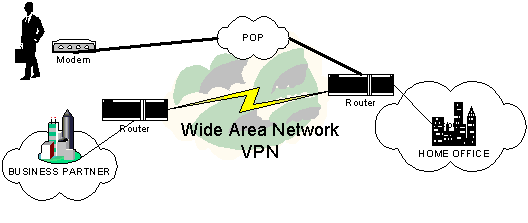
VPN stands for Virtual Private Network.
VPN is “any network built upon a public network and partitioned for use by individual customers”.
A VPN allows you or your company to use a public media, such as the Internet, to provide end-to-end connection. This allows you to design a cost effective solution for your clients but you must be aware of all the major design considerations that follow. Your main issue, of course, will be Security and Encryption. VPNs use encryption and tunneling to establish secure connections.
There are three different corporate or business uses of VPNs:
Remote Access
Intranet
Extranet
Basic VPN Design
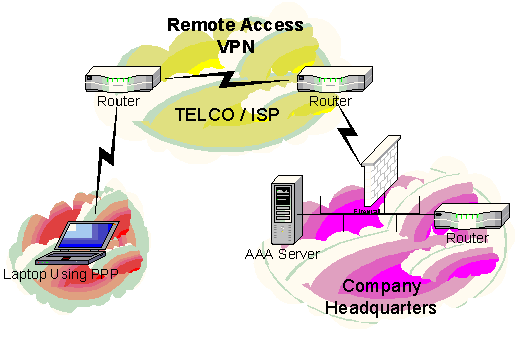
Remote Access VPN Design
Remote Access VPNs provide remote access to mobile or remote site users.
A Remote Access VPN solution will allow a connection to a corporate Intranet or extranet over a public infrastructure.
Access VPNs enable mobile or remote users to access resources at company headquarter locations.
Access VPNs encompass many technologies, including:
Analog
Dial up
ISDN
Digital subscriber line (DSL)
Mobile IP
Cable technologies
Intranet VPN Design
Intranet VPNs provide a link over a shared infrastructure using mostly dedicated connections.
They connect:
Corporate headquarters
Remote offices
Branch offices
An Intranet connects entities together, most of them trusted entities. When you let your doors open to un-trusted or less trusted entities, you begin to create an Extranet based VPN.
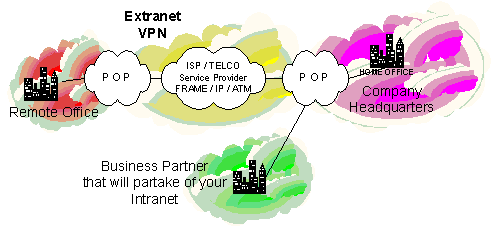
Extranet VPN Design
Extranet VPNs Provide a link to a corporate Intranet over a shared infrastructure using mostly dedicated connections.
They connect:
Customers
Suppliers
Partners
Other communities of interest
Now external customers can take part in your Intranet solution. This would be a typical design if you wanted to have an external business partner take part in some of your web server transactions or access a database. This of course puts a new twist into your design where you need to start thinking about intrusion detection systems or ways to monitor access.
Notice that in the above scenario you are allowing access to your Intranet over the VPN Solution.
For more Documentation on VPN Strategies from Cisco, visit these links
Read VPN: Your Guide to the New World Opportunity.
Read VPN Overview By Cisco (Design Examples)
Factors to consider when designing your VPN Solution
What are the advantages of having a VPN strategy as part of your Network Design?
Cost Savings
When designing and implementing a VPN, you can sell the fact that organizations no longer have to use expensive leased or frame relay lines to provide end to end connectivity in every situation. Now, remote users can connect to their corporate networks via a local ISP
Calculate your savings with Cisco's Remote Access VPN Savings Calculator
Security
VPNs can provide a high level of security using advanced encryption techniques and authentication protocols
Some of these protocols are PPTP and L2TP (They are Tunneling Protocols that provide encryption)
Scalability
VPNs give flexibility to companies to have a remote access infrastructure (Some cannot afford expensive lines)
Corporations are able to add a virtually unlimited amount of capacity without adding significant infrastructure. You must remember that the following should be taken into your design: although it will scale, you will not get a dedicated rate of bandwidth nor will you be able to fully rely on its dependability
Compatibility with Broadband Technology
VPNs allow mobile workers, telecommuters and day extenders to take advantage of high-speed, broadband connectivity, such as DSL and Cable, when gaining access to their corporate networks. This provides workers significant flexibility and efficiency
Note that this is also a security problem. Design your VPN’s with security taking a high priority
Remember: You get what you pay for. If you are designing a network for a client, you will need to take into account that although you are saving money, you may not be able to provide the most redundancy or offer a guarantee of bandwidth. A VPN solution should be implemented into an infrastructure with much thought and planning.
VPN Products
Cisco 1720 VPN Router Overview
Note: The 1700 series router has a snap in module (inside) and this is the encryption component.
Cisco 1720 VPN Router (Product Literature)
Cisco 1720 VPN Router (Documentation)
Cisco 1720 VPN Router (Technical Assistance)
Cisco 7100 Series VPN Router Overview
Cisco 7100 Series VPN Router (Product Literature)
Cisco 7100 Series VPN Router (Documentation)
Cisco 7100 Series VPN Router (Technical Assistance)
Integrated Services Adapter Module (Product Literature)
Security and Encryption
First visit and read where Cisco is leveraging the company for the near future and beyond. They call it SAFE.
Note: This single document will contain many design examples on where Cisco deems Security important. It is highly recommended that you download and read it.
Three Phases of Securing a Network
Setting up a security policy that will define the security goals of an enterprise
Use a “Defense in Depth” approach in your design. This entails implementing network security with a multi-layered design so that the enterprise does not fully depend or rely on one type of technology or one layer of defense to solve all security related issues
Consistent auditing of the network to make sure that the security policy is being enforced. You can use the results of the audits to modify the security policy and the technology implementation as you develop your design. The CiscoSecure ACS (TACACS+) does a fantastic job of performing router login auditing amongst other things. This would be a product that you could incorporate into your design as a Layer one defense
To view the CiscoSecure ACS Product Click here. Note that this product also runs on Solaris.
Cisco Network Security SolutionsNote: Know how to leverage these products into your network design
Determines whether network traffic crossing in either direction is authorized.
Is an add-on module to Cisco IOS software It provides advanced firewall capabilities, security technology such as intrusion detection and authentication.
Detects unauthorized activity on the network, responds to it, and send alarms back to the management console.
Is software that scans networks to find security vulnerabilities and will provide recommendations to correct them (Cisco’s Port/ Vulnerability Scanner)
Enables deployment of network policies on the network, centrally manages policies on PIX firewalls, VPNs, and Cisco Secure IDS systems.
Offer comprehensive security posture assessments by highly experienced teams of Cisco Network Security Engineers.
Cisco Secure Encyclopedia (CSEC)
MUST VISIT
Has been developed as a central warehouse of security knowledge to provide Cisco security professionals with an interactive database of security vulnerability information.
Delivers easy-to-use authentication, authorization, and accounting services for both small and large access environments.
Is a program designed to deliver comprehensive, interoperable security solutions for Cisco networks to our customers and our Associates customers.
Five Key Elements of Network Security
Identity
Perimeter Security
Data Privacy
Security Monitoring
Policy Management
Details of Five Key Elements
Identity
Defined as the accurate and positive identification of network users, hosts, applications, services, and resources
Technologies used to perform solid identification are:
Authentication protocols such as RADIUS and TACACS+
Kerberos (And a TGS -Ticket Granting Server)
One-time password tools
New technologies are beginning to emerge and perform increasingly important roles in identification solutions
Digital certificates
Smart cards
Directory services
Perimeter Security
Perimeter security provides a means to control access to critical resources such as network applications, data, and services
You want to control access so only legitimate users and information can traverse your network
Routers and switches with ACL’s (access control lists) provide this control by filtering by IP / port
Other tools that perform Perimeter Security
Firewall
Virus scanner
Content filter
Data Privacy
Effective data privacy can be provided by several methods including:
Tunneling
Data separation
GRE (Generic Routing Encapsulation) or L2TP (Layer 2 Tunneling Protocol) provides data separation and tunneling
Other implementations include using protocols such as IPsec for digital encryption
This added protection is especially important when designing VPNs
Security Monitoring
How do you know your design worked? Any good designer must review and test their design regularly at periodic intervals to ENSURE that the design works. You have to test your design and monitor it.
Network vulnerability scanners (Cisco Secure Scanner) can identify weak areas
Intrusion detection systems (Cisco Secure IDS) can monitor and respond to security events in real time
Policy Management
As you continue to design and grow your network, how do you manage it?
You can use Cisco Security Policy Management tools to provide such management
Know how to implement overall management products into a design, especially for large enterprise size companies
Note: Know how to leverage the Cisco Line of Security Products against these five elements when you propose a design.
Please Visit Cisco Network Security Documentation and read it (This document contains various examples of attacks and designs).
Designing for Security
Network assets can include:
Network hosts (including the hosts' operating systems, applications, and data)
Internetworking devices (such as routers and switches)
Network data that traverses the network
Intellectual property
Trade secrets
Company’s reputation
Note: Protecting these assets is the intent of network security Design measures.
Analyzing Security Design Decisions
When Analyzing the design you need to achieve a balance between certain factors. These factor include:
Affordability
Usability
Performance
Availability
Security adds to the overall workload by adding responsibility for maintaining user login IDs, passwords, and audit logs
Security Design Considerations
Designing and implementing network security will affect network performance
Packet filters and data encryption will take a toll on CPU power and memory
Encryption can use more than 15 percent of available CPU power
If you design a network with a dedicated device to do the encryption, it will still add latency because packets still have to be encrypted or decrypted and this adds delay
Availability is affected and this happens when you create a choke point, which will force all your data traffic out one point, the device doing the encrypting and decrypting
This also creates one point of failure
Cisco recommends that “to maximize performance and minimize security complexity, a router that is running encryption probably should not offer load balancing. So instead, implement load balancing on the routers between the pair of devices offering encryption” This should be taken into consideration when planning your design.
AAA
View this Case study Provided by Cisco: Cisco AAA Implementation Case Study.
Authentication
Identifies who is requesting services on the network
Most security policies state that “to access a network and its services a user must enter a name and password that are authenticated by a security server”
One Time Passwords:
Enhances security greatly because once the password is used, it is changed
This makes it nearly impossible to guess or be susceptible to a well-focused dictionary attack
This is often accomplished through a software application
It can also be implemented with a security card (resembles a credit card)
User enters a PIN (personal identification number) that enables them to use the software or the card
The password will be synchronized with a centralized security server
Authorization
Authentication controls “who” can access network resources
Authorization controls “what” they can do when they have access
Authorization grants privileges to processes and users
Authorization lets a security administrator control parts of a network such as directories and files on servers
Accounting
Collecting data for accountability is called accounting. This is also known as auditing
If you have designed a strict security policy, you will probably be auditing all attempts to achieve authentication and authorization by any person. (If you have used the CiscoSecure ACS product you can set this up on routers so that any attempt to access the router is audited and logged.) This is highly recommended in any Network Security design
It is most important to log "anonymous" or "guest" access to public servers
What is even better to implement into your design is a Honey Pot. A Honey Pot is a nice little trap you can implement. Here is the design:
Basic Attack and how to get accountability:
Data Encryption
Encryption is enabled to protect data from being read by anyone except who you intend to receive and view it
An encryption device encrypts data before placing it on a network
A decryption device decrypts the data before passing it to an application
An encryption or decryption device can be a router, server, end system, or dedicated device
Encrypted data is sometimes called ciphered data
Data that is not encrypted is called plain text or clear text
You would want to encrypt data for many reasons. One main reason that you can explain to your clients when you go over your design is to explain the major need for encryption in the first place. If you think about it, Telnet and SNMP send passwords, strings, and any other form of authentication in clear text. If you telnet to a router and an attacker plays man in the middle, you could be jeopardizing your security. Instead, incorporate encryption into your design so that if the attacker does capture your data, they probably will not be able to crack the encryption and use it against you
Another need for encryption in your design stems from the true nature of VPN, which transports data over a public medium. Thus, you will definitely need to incorporate encryption into your design using encryption-based protocols
PIX Firewall Products
Cisco Secure PIX Firewall Overview, Firewalls Overview
Cisco Secure PIX Firewall (Product Literature)
Cisco Secure PIX Firewall (Documentation)
Cisco Secure PIX Firewall (Technical Assistance)
Note: Be familiar with the PIX product and how to leverage it into your designs.
Last Tips for Advanced Design
Please visit and Use Cisco’s site, paying particular attention to the below Links. Good Luck!
Introduction (To Design)
This document deals with NT-based products external security design
This excellent document will help you get a feel for how to implement servers into your design when dealing with Bastion hosts, the DMZ and many other factors that you WILL incorporate into your design
You will be expected to be familiar with this technology when you implement and plan out an advance design for your clients